
Yes, Slack has to-do lists, with one catch. Slack Lists, the built-in option with assignees and due dates, is only on paid Slack plans. On the free plan you have canvas checklists without assignees, or a task app like Let's Do. This guide compares all three so you can pick what fits your team.
Slack Lists (paid plans)
Slack introduced Lists as a built-in task tracking feature. Lists let you create structured task boards with custom fields, assignees, due dates, subtasks, and status tracking directly inside Slack.
What you get:
- Kanban-style task boards inside Slack
- Custom fields and statuses
- Assignees and due dates
- Subtasks with their own assignees and due dates
- Filtering, sorting, and multiple views
- Workflow-based automations for due date reminders
The catch: Lists requires a paid Slack plan (Pro, Business+, or Enterprise Grid). If your team is on the free plan, Lists is not available. There's also a limit of 1,000 items per list on Pro and Business+ plans.
Canvas checklists (any plan)
Slack Canvas (which replaced the older "Create a post" feature) lets you create documents with checklist formatting. You can use these as simple to-do lists.
How to create one:
- Open any Slack channel or direct message.
- Click the Canvas icon (the notebook icon) to create or open a Canvas.
- Type
/to open the insert menu, then select "Checklist" to add a to-do list. - Add your tasks as checklist items. Anyone with access to the Canvas can check items off.
What you get:
- Simple checkbox lists
- Shared with channel members
- Rich text formatting (headings, links, mentions)
What's missing: No assignments, no recurring tasks, no subtasks. You can add a date to a canvas and set a reminder for yourself. Nobody else gets reminded. Canvas checklists are plain lists without task management features. They work for quick shared lists but become hard to manage as your team grows.
Note on availability: Canvas is available on all Slack plans. On the free plan, canvases are limited to channels and DMs.
Task management apps (free options)
For teams that need real task management features inside Slack, dedicated apps fill the gap. Apps like Let's Do add full to-do list functionality to Slack without requiring you to leave the app or upgrade your Slack plan.
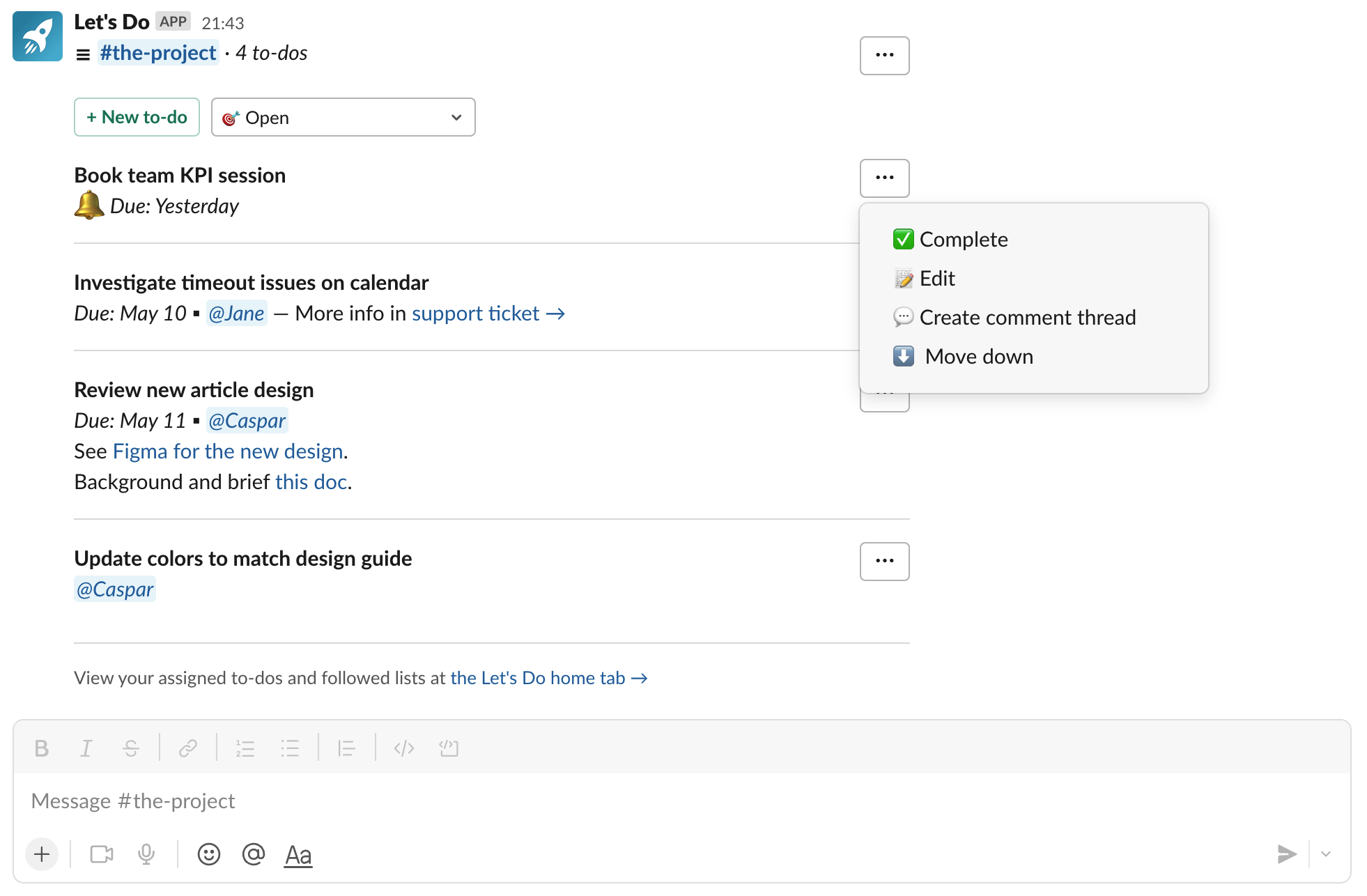
What you get with a task app like Let's Do:
- Shared to-do lists in any Slack channel
- Task assignments to team members
- Due dates with automatic reminders
- Recurring tasks (daily, weekly, custom schedules)
- Subtasks and descriptions
- Pinned lists for channel-level visibility
- Personal to-do lists in the app home
- Team overview dashboard
Let's Do works on Slack's free plan and offers a free 14-day trial. After that, plans start at a flat monthly price regardless of team size. Other options in this category include Workast and Asana's Slack integration. If you're deciding between a Slack-native app and a full PM tool, see our comparison of Slack vs Asana, Jira, and Monday.
Side-by-side comparison
| Feature | Slack Lists | Canvas | Let's Do |
|---|---|---|---|
| Works on free Slack plan | ✗ | ✓ | ✓ |
| Task assignments | ✓ | ✗ | ✓ |
| Due dates | ✓ | ✗ | ✓ |
| Reminders | Via automations | ✗ | ✓ |
| Recurring tasks | ✗ | ✗ | ✓ |
| Subtasks | ✓ | ✗ | ✓ |
| Channel-based lists | ✓ | ✓ | ✓ |
| Team overview / dashboard | ✗ | ✗ | ✓ |
Which approach should you pick?
Use Slack Lists if your team already has a paid Slack plan and you want a built-in solution without adding another app.
Use Canvas checklists for quick, informal lists that don't need assignments or due dates. Great for meeting notes or brainstorm lists.
Use a task management app if you need assignments, due dates, recurring tasks, or reminders. Especially useful if your team is on Slack's free plan, since Lists is not available.
For more on managing tasks in Slack, see our complete guide to task management in Slack.
Frequently asked questions
Does Slack have a to-do list?
Yes, Slack has several to-do list options. Slack Lists is a built-in task tracking feature available on paid plans. On any plan, you can create checklist-style to-do lists using Slack Canvas. For more advanced task management with assignments, due dates, and recurring tasks, you can use a free Slack app like Let's Do.
What is the best to-do list app for Slack?
The best to-do list app depends on your needs. Let's Do is built specifically for Slack and offers shared to-do lists in channels, task assignments, due dates, recurring tasks, and subtasks. Other options include Workast and Asana's Slack integration. Let's Do works on Slack's free plan and has a flat monthly price regardless of team size.
Can I use a to-do list in Slack for free?
Yes. While Slack's built-in Lists feature requires a paid Slack plan, you can create simple checklist to-do lists using Canvas on any plan. For full task management features like assignments and due dates, third-party apps like Let's Do offer free trials and affordable plans that work with Slack's free tier.
Can I assign tasks with a due date in Slack for free?
Not with Slack's built-in tools. Lists has assignees and due dates on paid plans only. Reminders only work for yourself or a channel. An app like Let's Do lets you assign a to-do to a teammate with a due date on Slack's free plan. They get a reminder on the day.